
2025: A Big Year for Pantry Pilot
Ze'ev - December 31st, 2025
Looking back at 2025, I'm proud of how much I've improved Pantry Pilot. What started as a tool to automate my weekly shop has grown into something that thousands of home cooks rely on to turn recipe inspiration into actual meals.
This year, I focused on three big areas: helping you organise, lifting up the performance and experience of Pantry Pilot on the web, and completely rebuilding how Pantry Pilot imports recipes from anywhere.
But beyond those big pillars, there have been hundreds of smaller improvements that make the day-to-day experience just that little bit better:
- Sharing recipes and shopping lists with housemates or family.
- Launching the iOS and Android apps — now live on the App Store and Google Play.
- Speeding up the shopping list for a smoother manual shop experience.
- Extracting notes and ingredient groups automatically during import.
- Faster load times across the board.
- Improved search so you can find that one recipe in seconds.
- Instagram @mention to import – just mention @pantrypilot in the comments of a reel!
It's been a busy year, and these updates all add up to a much more polished experience. Let me walk you through the big changes.
A Faster, Smoother Experience Everywhere
This year, I've poured a lot of love into making Pantry Pilot feel snappier and more polished, especially on mobile.
Mobile Polish
I've completely redesigned the onboarding flow to be more welcoming and intuitive. New users now get a proper tour of what Pantry Pilot can do, without feeling overwhelmed or pushy. I've also fine-tuned the iOS experience. A heap of polish has gone into making the app feel more native, from safe area handling to form inputs that work nicely on mobile keyboards.
The recipe view has been completely reimagined for mobile screens. Images load faster and the recipe content scrolls smoothly over the image. Actions like sharing use a native feeling modal and are easier to use.
Performance That Actually Matters
This year, I've poured a heap of work into making Pantry Pilot feel lightning-fast. The difference is night and day.
Navigation is nearly instant – Moving between tabs, recipes, and shopping lists happens in a flash. I've implemented some pre-emptive caching in a bunch of different places, so the data you need is often already waiting for you before you even click.
Shopping list performance – The list loads immediately without any loading state. Items can be added and removed with minimal delay, and everything stays in sync across devices.
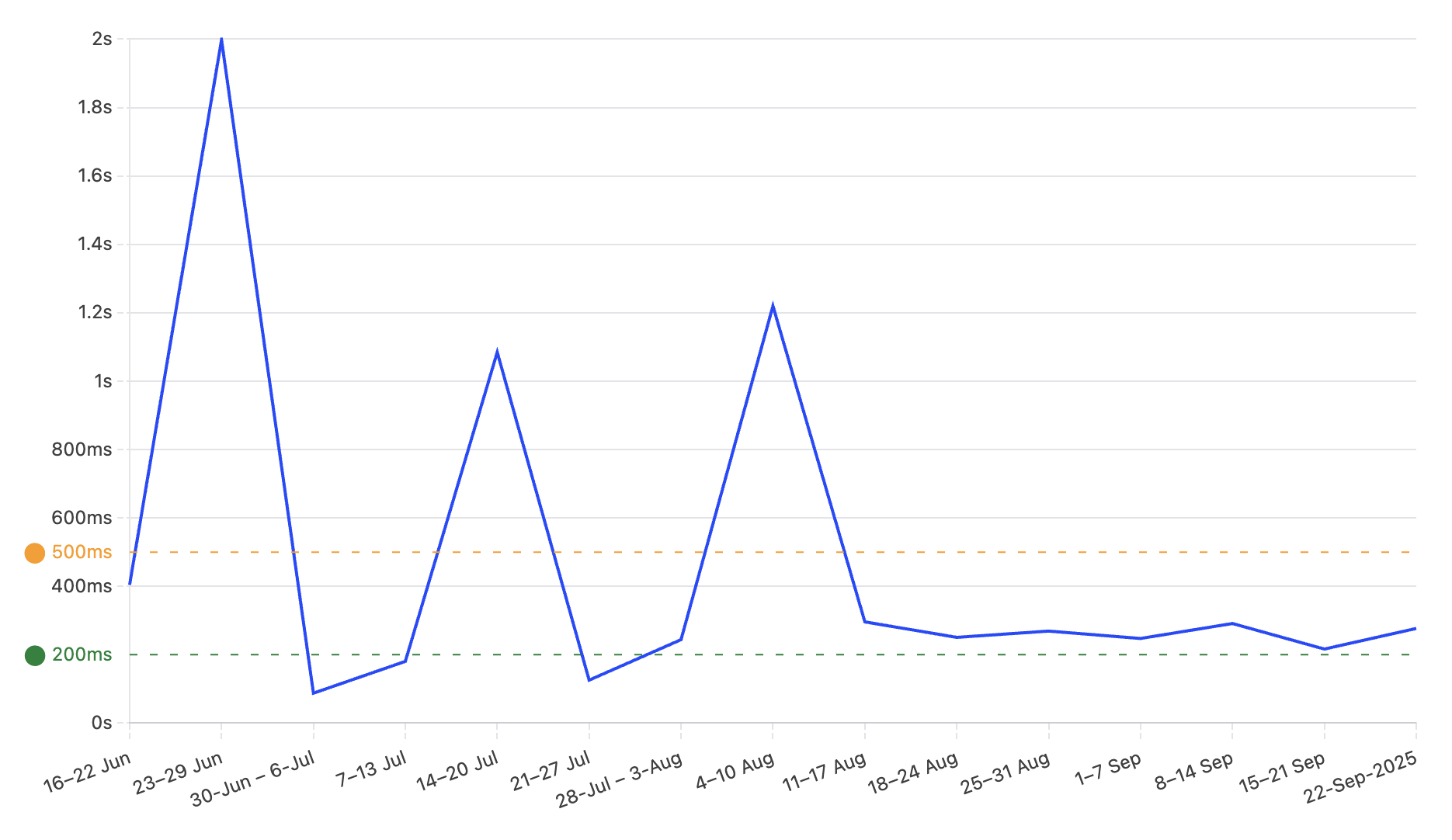
Recipe load times – P99 Interaction to next paint INP web vitals for the recipe view are now down to < 300ms. That means when you tap a recipe, it feels instant.
The shopping list now shows a live count in the navigation bar, so you can see at a glance how many items you've got. Small touches like this make the whole experience feel more polished and complete.
Import Pipeline 2.0: Recipes from Anywhere, Better Than Ever
I've completely rebuilt how Pantry Pilot imports recipes from the web, and the difference is night and day.
What's Changed
The new V2 import pipeline is faster, more accurate, and handles a wider variety of recipe formats. Whether you're importing from a food blog, Instagram, Pinterest, or a random recipe site, I've made the whole process smoother.
Streaming recipe generation – Instead of waiting for the entire recipe to process, you now see it come together in real-time. The recipe title appears first, then ingredients start streaming in, followed by instructions. It's like watching a recipe materialise right in front of you.
Smarter extraction – I've improved how Pantry Pilot extracts recipe data from different sources. The AI now better understands ingredient groups (like "For the marinade" or "Garnish"), cooking notes, and special instructions. It's more accurate and preserves more nuance from the original recipe.
Instagram @mention to import – This has been a game changer for how we save recipes. You can now just @mention @pantrypilot in a comment on any post or reel. Within a minute, that recipe is waiting for you in your collection. Read the full story on mention-to-import here.
Organise Your Recipes with Custom Categories
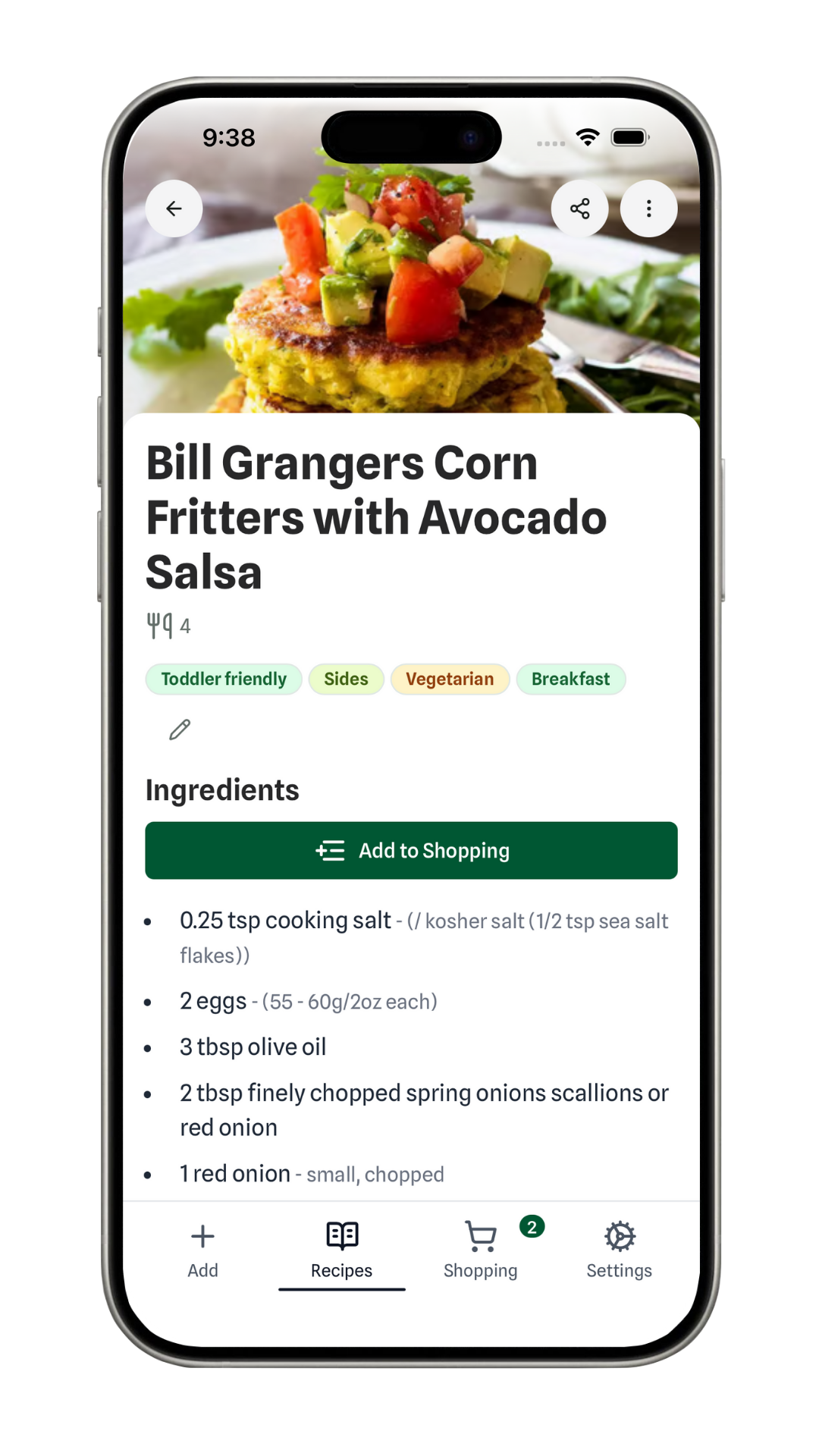
Pantry Pilot power users often ask for a way to organise their recipes better. This year, I built custom categories to help you manage those large collections and find exactly what you need for specific needs. Whether that's "Toddler Friendly" snacks, "Vegetarian" mains, or your go-to "Desserts".
Pantry Pilot will automatically categorise your imported recipes to save you time, but you still have total control to make manual edits and keep things exactly how you like them.
What You Can Do
- Create custom categories – Tailor your collection to your lifestyle. Think "High Protein", "Quick Mid-week", or "Baking with Kids".
- Auto-backfill existing recipes – If you’ve already got a massive library, don’t panic. I've added a backfill feature that can automatically categorise your existing recipes based on their content.
The category badges appear throughout the app – on recipe cards, in search results, and when you're browsing. I'm just getting started with this feature, expect more features and improvements to categories in 2026.
What's Next?
Looking ahead to 2026, I'm focusing on making Pantry Pilot even more helpful for your weekly shop. I'm working on smarter meal planning suggestions, better integration with more grocery retailers, and features that help reduce food waste.
But honestly, the best part of this year has been hearing from you – the home cooks who use Pantry Pilot every week. Your feedback shapes everything I build, and I'm grateful for every suggestion, bug report, and kind word.
Try It Out
If you haven't used Pantry Pilot in a while, now's a great time to jump back in. The app is faster, more organised, and imports recipes better than ever. And if you're new here, welcome! Sign up for free and see what all the fuss is about.
Prefer mobile? Grab Pantry Pilot on the App Store or Google Play.
Here's to more delicious meals and less time spent in supermarket aisles. Happy cooking!
More to Explore
- Curious about how Pantry Pilot works? Read Pantry Pilot: Your AI Agent for Grocery Shopping.
- Want the easiest way to save recipes? Check out Instagram @mention to import.
- Need to save recipes from other sites? Our guide on How to Save Recipes from Instagram covers the basics.
- Planning meals with your partner? From Dinner Debates to Delicious Duos shows you how.